Lifecycle
View the complete IP address assignment history for a network.
The Lifecycle page provides a full audit trail of IP address assignments within the selected network. Every assignment event — whether from DHCP, manual entry, or scan-based discovery — is logged with details about who assigned the IP, when it was assigned, and which device received it.
This page is useful for compliance, troubleshooting, and understanding historical IP utilization patterns.
How to Use:
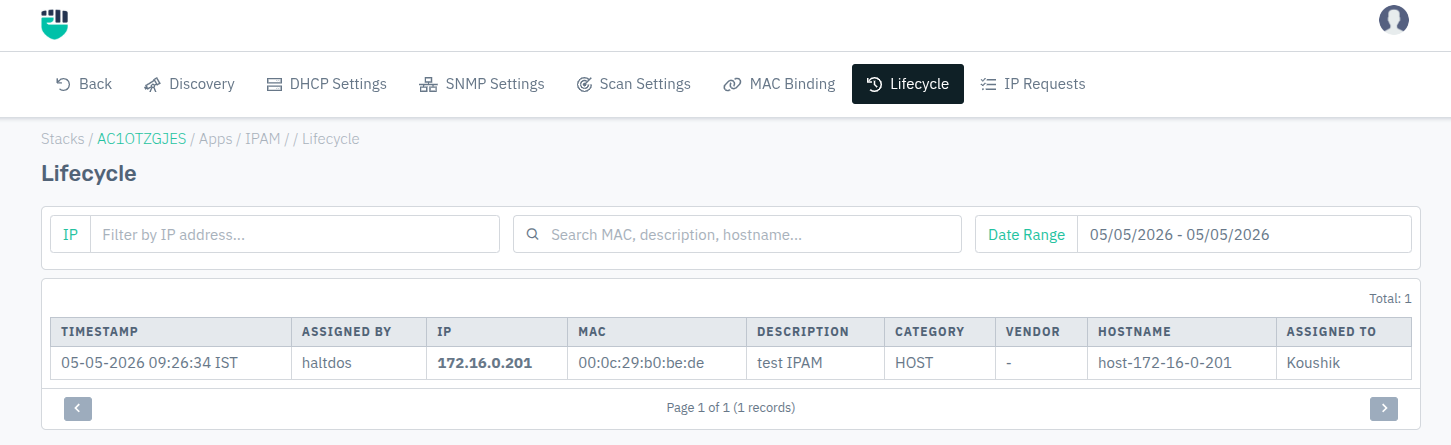
- Go to Stack > IPAM > Networks > select a network > Lifecycle.
- Use the filters to narrow results by IP address, keyword, or date range.
- Browse the paginated table using the Previous and Next controls.
Filters
| Filter | Description |
|---|---|
| IP | Filter entries by a specific IP address |
| Search | Free-text search across MAC address, description, and hostname |
| Date Range | Restrict results to a specific time window |
Lifecycle Table
| Field | Description |
|---|---|
| Timestamp | Date and time of the assignment event |
| Assigned By | The user or system that performed the assignment |
| IP | The IP address that was assigned |
| MAC | MAC address of the device that received the IP |
| Description | Label or note associated with this address entry |
| Category | Device category — Router, Switch, Server, Host, etc. |
| Vendor | Hardware vendor identified from the MAC OUI |
| Hostname | DNS hostname of the device |
| Assigned To | The user or entity to which the IP was assigned |