Settings
Configure global IPAM settings for DHCP lease management.
The Settings page contains global configuration options that apply to the DHCP server across all networks managed by Haltdos IPAM.
How to Use:
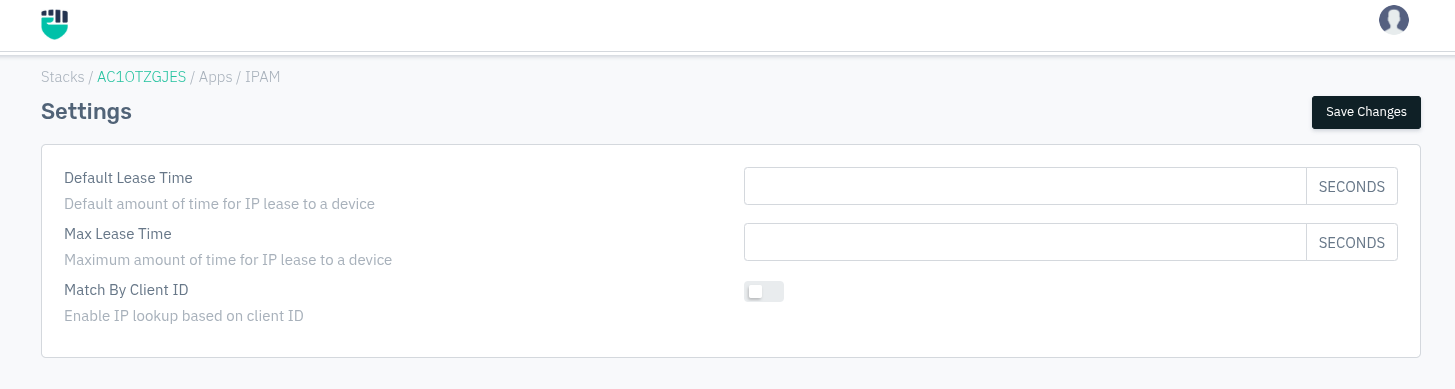
- Go to Stack > IPAM > Settings.
- Update the required fields.
- Click Save Changes.
Description:
Default Lease Time
The default duration (in seconds) for which an IP address is leased to a device when the client does not request a specific lease duration. If left blank, the DHCP server uses its built-in default.
Accepted values: Integer (seconds)

Example: 86400  (24 hours)
Max Lease Time
The maximum duration (in seconds) for which an IP address can be leased to a device, regardless of what the client requests. If left blank, no upper bound is enforced beyond the DHCP server's built-in limit.
Accepted values: Integer (seconds)

Example: 604800  (7 days)
Match By Client ID
When enabled, DHCP IP lookup and assignment is performed using the DHCP client identifier (option 61) instead of the MAC address alone. This is useful in environments with virtual machines or devices that may share or cycle MAC addresses.
Accepted values: Enabled / Disabled

Default: Disabled