TCP Setting
TCP Setting lets you tune how the instance handles TCP connections at the kernel level. These settings affect connection performance, resilience against SYN flood attacks, keepalive behaviour, and buffer sizes. Most of these are advanced kernel parameters — the defaults work fine for most deployments, but can be adjusted for specific performance or security requirements.
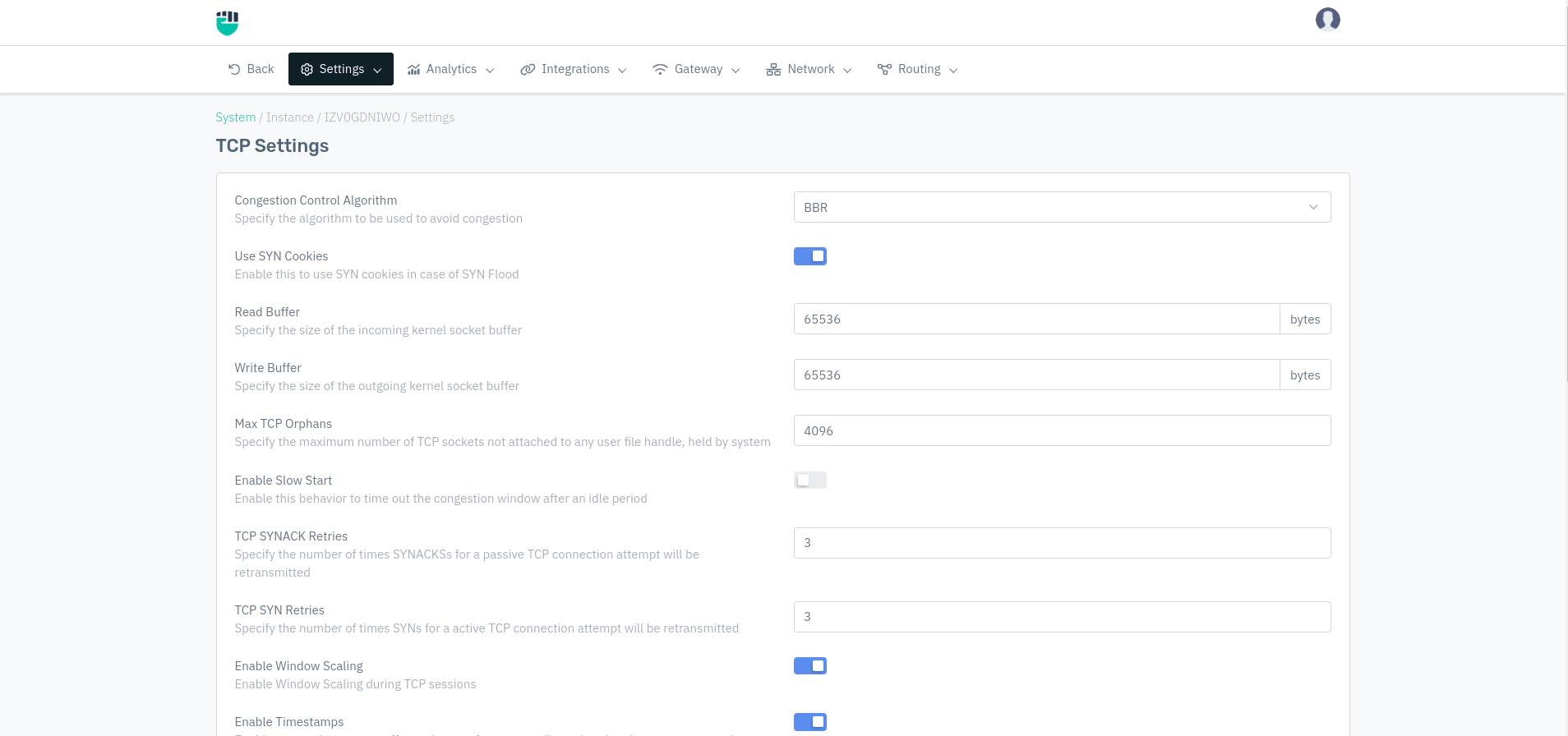
How to Use:
- Go to System > Instance > (Select Instance) > Setting > TCP Setting
- Configure your settings
- Click Save Changes
Description
Congestion Control Algorithm
The algorithm the kernel uses to manage TCP congestion — i.e., how it decides to speed up or slow down data transmission when the network is busy.
    Accepted values: BBR / RENO / CUBIC

    Default: BBR
| Algorithm | Best for |
|---|---|
| BBR | High-throughput, high-latency networks. Google-developed algorithm that optimises for bandwidth and round-trip time. Recommended for most deployments |
| CUBIC | Standard Linux default. Works well on high-bandwidth networks with moderate latency |
| RENO | Older, simpler algorithm. Suitable for low-latency, stable networks |
Use SYN Cookies
When enabled, the kernel uses SYN cookies to handle incoming connection requests during a SYN flood attack. SYN cookies allow the server to respond to SYN requests without allocating memory for each half-open connection, protecting against exhaustion attacks.
    Accepted values: Enable / Disable

    Default: Enable
It is recommended to keep this enabled. Disabling SYN cookies makes the instance more vulnerable to SYN flood attacks.
Read Buffer
The size of the kernel socket buffer used for incoming data, in bytes. A larger buffer allows more data to be received before the application reads it, which helps on high-throughput connections.
    Accepted values: Integer

    Default: 65536
Example: 65536 = 64 KB. For high-throughput environments, this can be increased to 131072 (128 KB) or 262144 (256 KB).
Write Buffer
The size of the kernel socket buffer used for outgoing data, in bytes. A larger buffer allows more data to be queued for sending before the kernel blocks the application.
    Accepted values: Integer

    Default: 65536
Example: 65536 = 64 KB.
Max TCP Orphans
Specify The maximum number of TCP sockets that are not attached to any user file handle but are still held by the system (orphaned connections).
    Accepted values: Integer

    Default: 4096
Example: 4096 — up to 4096 orphaned TCP sockets are allowed before the kernel starts resetting them.
Enable Slow Start
Enable this behavior to time out the congestion window after an idle period
    Accepted values: Enable / Disable

    Default: Disable
For most web traffic with short idle periods, keeping this disabled gives better performance since connections resume at full speed after brief pauses.
TCP SYNACK Retries
How many times the server retransmits a SYN-ACK for a passive (incoming) TCP connection attempt before giving up. Applies when the client's ACK is not received.
    Accepted values: Integer

    Default: 3
Example: With 3, the server tries sending SYN-ACK up to 3 times before dropping the connection attempt.
TCP SYN Retries
How many times the client retransmits a SYN for an active (outgoing) TCP connection attempt before giving up.
    Accepted values: Integer

    Default: 3
Example: With 3, the connection attempt is retried 3 times before being declared failed.
Enable Window Scaling
Allows TCP window sizes larger than 65535 bytes by using a scaling factor. Required for high-bandwidth, high-latency connections (e.g., across WAN links) where the standard window size becomes a bottleneck.
    Accepted values: Enable / Disable

    Default: Disable
Enable Timestamps
Enable to turn timestamps off to reduce performance spikes related to timestamp generation
    Accepted values: Enable / Disable

    Default: Disable
Enable Selective ACKs
When enabled, the receiver can acknowledge specific out-of-order segments rather than only the last in-sequence segment. This allows the sender to retransmit only the missing segments rather than everything after the gap, improving performance on lossy connections.
    Accepted values: Enable / Disable

    Default: Disable
Enable TCP SACKs
Allows TCP to send Selective Acknowledgements (SACKs) in its responses, informing the sender exactly which data was received and which is missing.
    Accepted values: Enable / Disable

    Default: Disable
Enable Selective ACKs and Enable TCP SACKs work together. Selective ACKs enables the SACK option at the connection level; TCP SACKs enables the actual sending of SACK blocks in acknowledgements.
Enable Duplicate SACKs
Allows TCP to send Duplicate SACKs (D-SACKs), which inform the sender when a segment was received more than once. This helps the sender detect spurious retransmissions and adjust its behaviour accordingly.
    Accepted values: Enable / Disable

    Default: Disable
Enable TCP Fast Open
When enabled, TCP Fast Open (TFO) allows data to be sent in the initial SYN packet for connections to servers that support it. This reduces the latency of TCP handshakes by one round-trip time for repeat connections.
    Accepted values: Enable / Disable

    Default: Disable
TCP Backlog Connections
The maximum number of pending connection requests (completed 3-way handshake but not yet accepted by the application) that can be queued. Requests beyond this limit are dropped.
    Accepted values: Integer

    Default: 1500
Example: 1500 — up to 1500 connections can wait in the accept queue. Under very high traffic, this can be increased to 4096 or higher.
TCP Keepalive Probes
How many keepalive probes are sent before the connection is considered dead, when the remote end is not responding.
    Accepted values: Integer

    Default: 5
Example: With 5, the system sends 5 keepalive probes spaced by TCP Keepalive Interval before declaring the connection dead.
TCP Keepalive Time
Specify how often TCP sends out keepalive messages when keepalive is enabled
    Accepted values: Integer

    Default: 1800
Example: 1800 = 30 minutes of idle time before the first keepalive probe is sent.
TCP Keepalive Interval
How frequently (in seconds) keepalive probes are sent after the first one, when no response has been received.
    Accepted values: Integer

    Default: 60
Example: 60 = one probe every 60 seconds. With TCP Keepalive Probes set to 5, a dead connection is detected after 5 × 60 = 300 seconds (5 minutes) from the first probe.
TCP FIN Timeout
Specify time an orphaned connection will remain in the FIN_WAIT_2 state before it is aborted at the local end
    Accepted values: Integer

    Default: 60
Example: 60 = an orphaned connection in FIN_WAIT_2 is cleaned up after 60 seconds. Reducing this (e.g., to 30) frees resources faster under high connection turnover.