Connection Sync Settings
Configure connection synchronization between WAF nodes using conntrackd. This ensures active connections remain uninterrupted during failover or redundancy scenarios.
The option is available when the user selects LLB as their application.
Overview
Connection Sync Settings are used to replicate connection tracking information between primary and secondary WAF nodes. This mechanism helps achieve high availability by synchronizing connection states, thereby avoiding session drops when failover occurs.
The configuration ensures seamless traffic handling, better uptime, and reduced disruption to client requests.
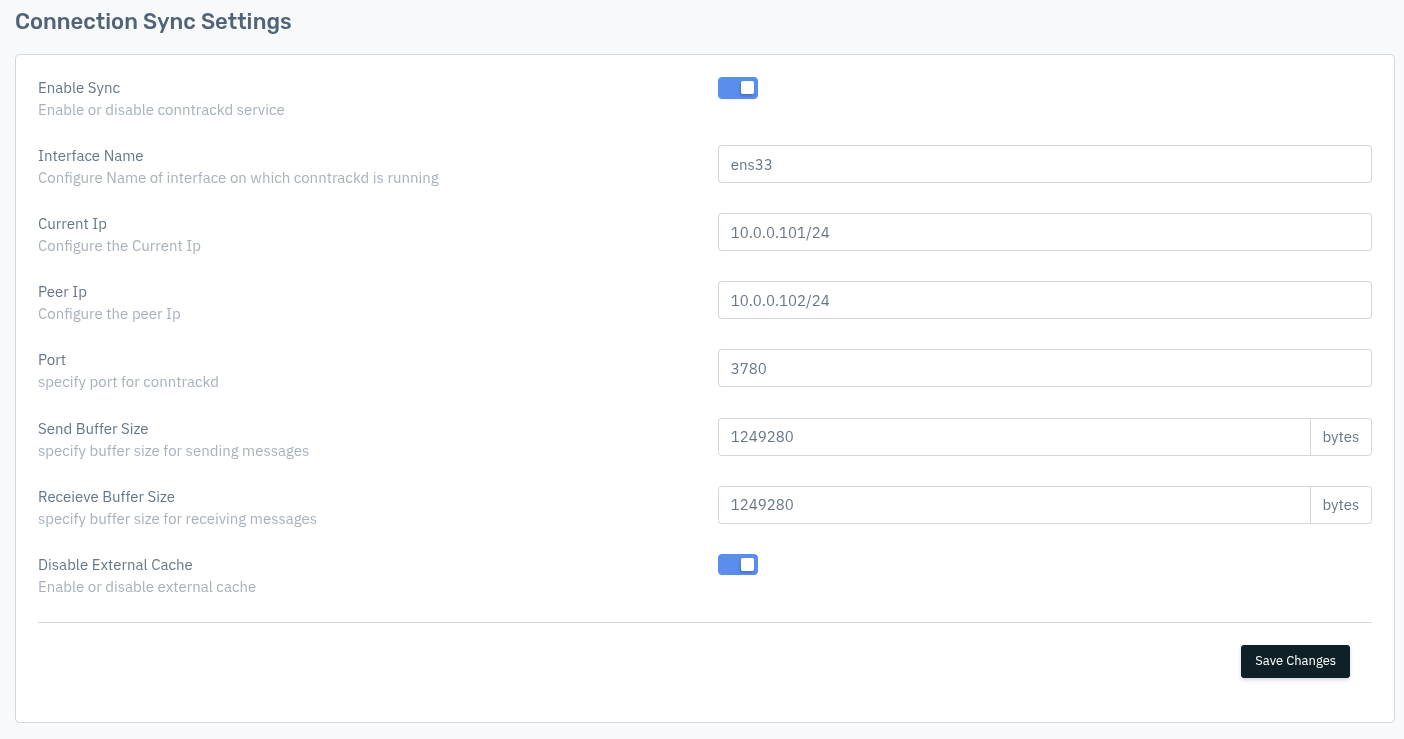
How to Use:
- Go to System > Instance > (Select Instance) > Setting > Connection Sync Settings
- Enable the Sync option
- Configure the required fields (interface, IPs, port, buffer sizes)
- Click Save Changes
Description
Enable Sync
Enable or disable the conntrackd service responsible for connection synchronization.
    Accepted values: Enable / Disable

    Default: Disabled
Enable Sync on both the primary and secondary nodes. Enabling it only on one node will result in one-way synchronization which does not provide full failover protection.
Interface Name
The name of the network interface on which the conntrackd service communicates between nodes. This should be a dedicated sync/HA interface, not the data interface carrying production traffic.
    Accepted values: String (Interface name)

    Default: Blank
Examples: ens33, ens192, bond0, eth1
Current IP
The IP address of the current node on the sync interface, with subnet mask in CIDR notation. This is the IP that conntrackd binds to on this node.
    Accepted values: IP with CIDR (Ex. 10.0.0.101/24)

    Default: Blank
Example: 10.0.0.101/24
Peer IP
Configure the peer node’s IP address with subnet mask. This IP will be used for synchronizing connection information.
    Accepted values: IP with CIDR (Ex. 10.0.0.102/24)

    Default: Blank
Example: 10.0.0.102/24
Current IP and Peer IP must be on the same subnet and must be reachable from each other on the configured Interface Name. Verify connectivity between the two nodes before enabling sync.
Port
The UDP port on which conntrackd listens and sends connection synchronization messages between nodes.
Accepted values : Integer (valid port range: 1–65535)
Default         : 3780
Example: 3780
Port 3780 is the default conntrackd port. If this port is already in use or blocked by a firewall between nodes, change it to an available port and ensure the same port is configured on both nodes.
Send Buffer Size
The size of the kernel buffer allocated for sending synchronization messages, in bytes. Larger buffer sizes reduce the chance of message drops under high connection rates.
Accepted values : Integer (in bytes)
Default         : 65536
Example: 65536 (64 KB — suitable for most deployments)
Increase the Send Buffer Size if you observe connection sync drops during high-traffic periods. Values like 131072 (128 KB) or 262144 (256 KB) can be used for high-throughput environments.
Receive Buffer Size
The size of the kernel buffer allocated for receiving synchronization messages, in bytes.
Accepted values : Integer (in bytes)
Default         : 65536
Example: 65536 (64 KB — suitable for most deployments)
Send Buffer Size and Receive Buffer Size should generally be set to the same value on both nodes to ensure symmetric communication.
Disable External Cache
When enabled, conntrackd operates in no-external-cache mode, writing connection state updates directly to the kernel conntrack table without buffering them in an in-memory cache first. This reduces memory usage but may increase CPU load.
Accepted values : Enable / Disable
Default         : Enable
| Setting | Behaviour |
|---|---|
| Enable (default) | External cache disabled — updates written directly to kernel conntrack table |
| Disable | External cache enabled — updates buffered in memory before writing to kernel |