SAML
Overview
SAML (Security Assertion Markup Language) is an open standard for exchanging authentication and authorization data between an Identity Provider (IdP) and a Service Provider (SP). Haltdos Platform supports SAML 2.0 to enable Single Sign-On (SSO), allowing administrators to log in to the Haltdos Management Console using their organization's existing identity provider — such as Okta, Azure AD, ADFS, or any SAML 2.0-compliant IdP.
When SAML is enabled, users are redirected to the configured IdP for authentication. Upon successful authentication, the IdP sends a SAML assertion back to Haltdos, which grants access based on the authority attribute in the assertion.
Before configuring SAML, you must register Haltdos as a Service Provider (SP) in your Identity Provider. You will need the SP Public Key and SP Private Key from Haltdos, and you will receive the IDP EntityId, SSO URI, SLO URI, and IDP Public Key from your IdP.
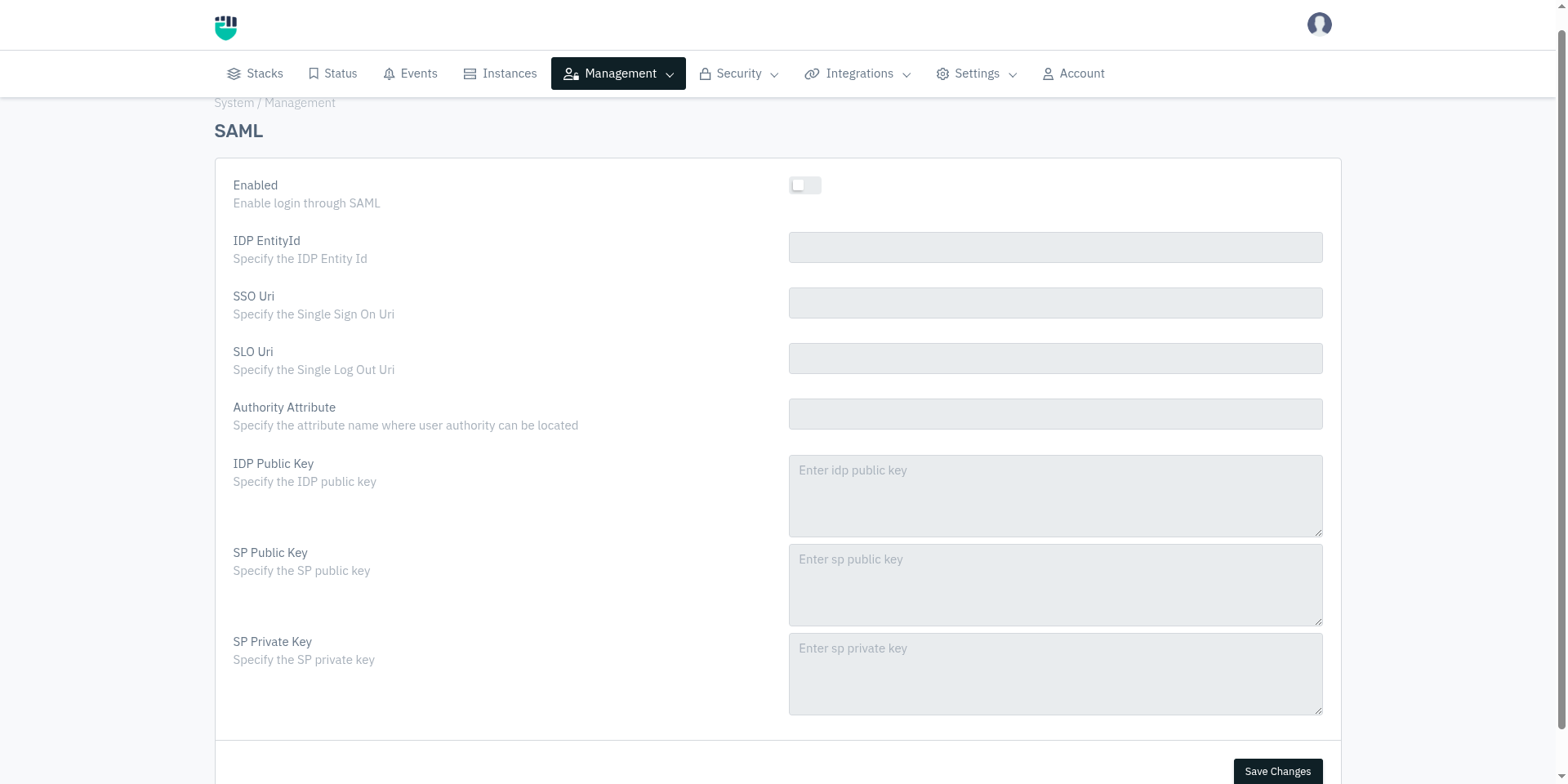
How to Use
- Go to System > Management > SAML
- Configure the settings as described below
- Click Save Changes
Field Reference
Enabled
Enables or disables SAML-based Single Sign-On for the Haltdos Management Console.
Accepted values : Enable / Disable
Default         : Disable
When disabled, SAML login is not available and users must authenticate using other configured methods (SYSTEM, LDAP, RADIUS, or TACACS).
IDP EntityId
The unique identifier of the Identity Provider. This value is provided by your IdP and is used by Haltdos to identify and validate the SAML assertions it receives.
Accepted values : String — URI format (as provided by your IdP)
Default         : Blank
Examples:
https://accounts.google.com/o/saml2?idpid=XXXXXXXXhttps://sts.windows.net/<tenant-id>/http://www.okta.com/exkXXXXXXXXXXXXXX
This value must exactly match the EntityId configured in your IdP's SAML application settings. A mismatch will cause authentication to fail.
SSO Uri
The Single Sign-On URL of the Identity Provider. This is the endpoint to which Haltdos sends SAML authentication requests when a user attempts to log in.
Accepted values : String — HTTPS URL (as provided by your IdP)
Default         : Blank
Examples:
https://accounts.google.com/o/saml2/idp?idpid=XXXXXXXXhttps://login.microsoftonline.com/<tenant-id>/saml2https://company.okta.com/app/company_haltdos/XXXXXXXX/sso/saml
SLO Uri
The Single Log-Out URL of the Identity Provider. When a user logs out from Haltdos, a SAML logout request is sent to this endpoint to terminate the SSO session at the IdP as well.
Accepted values : String — HTTPS URL (as provided by your IdP)
Default         : Blank
Examples:
https://login.microsoftonline.com/<tenant-id>/saml2https://company.okta.com/app/company_haltdos/XXXXXXXX/slo/saml
If your IdP does not support Single Log-Out, you may leave this field blank. Users will still be logged out from Haltdos but their IdP session may remain active.
Authority Attribute
The name of the SAML attribute in the IdP's assertion that carries the user's role or authority level. Haltdos reads this attribute from the SAML response to determine what level of access to grant the authenticated user.
Accepted values : String — attribute name as configured in your IdP
Default         : Blank
Examples:
authorityrolehaltdos_role
The value of this attribute in the SAML assertion must match one of the valid authority values supported by Haltdos: ADMIN, READ_WRITE, READ, or VISIBLE. If the attribute value does not match, access will be denied.
This attribute name must match exactly what your IdP is configured to send in the SAML assertion.
IDP Public Key
The public certificate of the Identity Provider, used by Haltdos to verify the digital signature on SAML assertions. This ensures that the assertions were genuinely issued by the trusted IdP and have not been tampered with.
Accepted values : String — X.509 certificate in PEM format (provided by your IdP)
Default         : Blank
Format: Paste the full certificate content including the header and footer lines:
-----BEGIN CERTIFICATE-----
<base64-encoded certificate content>
-----END CERTIFICATE-----
SP Public Key
The public certificate of Haltdos (acting as the Service Provider). This is shared with your IdP so that the IdP can encrypt SAML assertions intended for Haltdos.
Accepted values : String — X.509 certificate in PEM format
Default         : Blank
Format: Paste the SP certificate in PEM format:
-----BEGIN CERTIFICATE-----
<base64-encoded certificate content>
-----END CERTIFICATE-----
SP Private Key
The private key corresponding to the SP Public Key. Haltdos uses this to decrypt SAML assertions received from the IdP.
Accepted values : String — RSA private key in PEM format
Default         : Blank
Format:
-----BEGIN RSA PRIVATE KEY-----
<base64-encoded private key content>
-----END RSA PRIVATE KEY-----
How SAML Authentication Works
User clicks Login on Haltdos Console
              ↓
Haltdos generates a SAML AuthnRequest
              ↓
User is redirected to IdP SSO URI
              ↓
User authenticates at IdP (username/password, MFA, etc.)
              ↓
IdP sends signed SAML Assertion back to Haltdos
              ↓
Haltdos verifies assertion signature using IDP Public Key
              ↓
Haltdos reads Authority Attribute from assertion
              ↓
Access granted based on authority value (ADMIN / READ_WRITE / READ)
Authority Attribute Values
The value of the Authority Attribute in the SAML assertion determines the access level granted inside Haltdos:
| Attribute Value | Access Level |
|---|---|
ADMIN | Full control — add, edit, delete all configurations and manage members |
READ_WRITE | Can view and modify configurations, cannot manage members |
READ | View-only access to configurations and analytics |
VISIBLE | Restricted view access |