Firewall Settings
Overview
The DNS Firewall settings allow you to configure various protections to block malicious domains, trackers, and inappropriate content. By using these features, you can enhance your network’s security and improve the user experience by filtering harmful or unauthorized content. Whether you want to prevent access to newly registered domains, block ads and trackers, or enforce safe search, these options give you control over your DNS traffic.
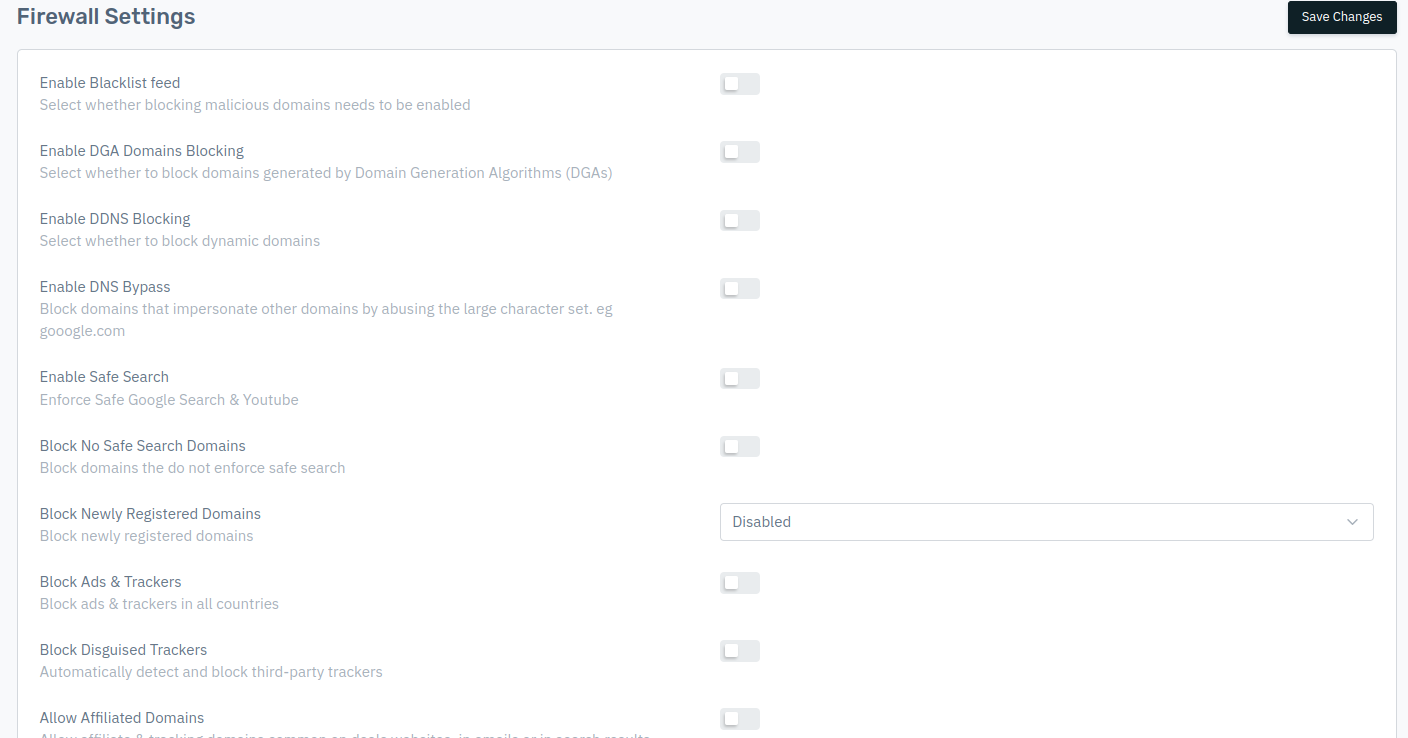
How to Use:
- Go to Stack > GSLB > Listener > DNS Firewall
- Configure the Firewall Settings configuration.
- Click on Save Changes.
- Firewall configuration will be saved.
Enable Blacklist feed
Enables blocking of access to known malicious domains using a blacklist feed. This feature uses continuously updated threat intelligence feeds containing domains associated with malware, phishing, ransomware, botnets, scams, and other malicious activity. When enabled, any DNS query matching a listed domain is blocked before a connection is established. This provides immediate protection against known threats without requiring manual rule creation.
    Accepted values: Enabled / Disabled

    Default: Disabled
Enable DGA Domains Blocking
Allows blocking of domains generated by Domain Generation Algorithms (DGAs) to prevent access to potentially malicious sites. Domain Generation Algorithms are commonly used by malware to automatically create large numbers of random domain names to contact command-and-control servers. These domains often look meaningless or randomly generated. Enabling this setting helps detect and block such algorithmically generated domains, preventing infected systems from communicating with attackers.
    Accepted values: Enabled / Disabled

    Default: Disabled
Enable DDNS Blocking
Enables blocking of dynamic domains to prevent access to potentially malicious or unstable sites. Dynamic DNS (DDNS) services allow users to frequently change the IP address associated with a domain. While legitimate in some cases, attackers commonly abuse DDNS services to host phishing pages, malware distribution servers, and remote access infrastructure. Blocking DDNS domains reduces exposure to attacker-controlled environments.
    Accepted values: Enabled / Disabled

    Default: Disabled
Enable DNS Bypass
Blocks domains that impersonate legitimate sites by using similar-looking characters, such as gooogle.com instead of google.com, to prevent users from accessing deceptive websites. Attackers often register lookalike or typo-squatted domains that closely resemble trusted brands. These domains are designed to trick users into entering credentials or sensitive information. Enabling this setting helps detect and block such deceptive domains, reducing the risk of phishing and brand impersonation attacks.
    Accepted values: Enabled / Disabled

    Default: Disabled
Enable Safe Search
Forces the use of Safe Search on Google and YouTube to filter out explicit or inappropriate content. When enabled, DNS responses are modified to enforce Safe Search restrictions at the search engine level. This ensures explicit content is filtered automatically, even if users attempt to disable Safe Search manually. This setting is commonly used in schools, corporate environments, and family-safe networks.
    Accepted values: Enabled / Disabled

    Default: Disabled
Block No Safe Search Domains
Blocks domains that do not enforce Safe Search, helping prevent access to sites with inappropriate content. Some search engines and content platforms do not provide Safe Search controls. This feature blocks such domains entirely, preventing users from bypassing Safe Search policies by switching to alternative services that allow unrestricted content.
    Accepted values: Enabled / Disabled

    Default: Disabled
Block Newly Registered Domains
Prevents access to domains that have been recently registered, which may be associated with malicious or suspicious activities. Newly registered domains are frequently used in phishing campaigns, fraud operations, and malware distribution because they lack reputation history. Blocking domains registered within a defined recent time window reduces exposure to zero-day threats and newly launched malicious campaigns.
    Accepted values: Disabled / Less than a week / Less than a month

    Default: Disabled
Block Ads & Trackers
Prevents the display of advertisements and blocks tracking technologies across all countries. This setting blocks DNS requests to known advertising networks and tracking infrastructure. It reduces user tracking, improves privacy, decreases bandwidth consumption, and minimizes exposure to malvertising (malicious advertisements that distribute malware).
    Accepted values: Enabled / Disabled

    Default: Disabled
Block Disguised Trackers
Automatically detects and blocks third-party trackers that disguise themselves to gather user data. Some tracking services attempt to appear as legitimate or first-party domains to avoid detection. This feature identifies and blocks such disguised tracking mechanisms, providing deeper privacy protection beyond standard ad and tracker blocking.
    Accepted values: Enabled / Disabled

    Default: Disabled
Allow Affiliated Domains
Permits access to affiliate and tracking domains commonly used on deals websites, in emails, or search results. Affiliate systems rely on tracking domains to attribute referrals, discounts, and marketing campaigns. When ad and tracker blocking is enabled, some affiliate services may be blocked unintentionally. Enabling this option ensures legitimate affiliate links and referral systems continue functioning properly.
    Accepted values: Enabled / Disabled

    Default: Disabled
Blocked DNS Category
Allows you to block DNS based on specific categories, such as adult content, gambling, or social media. This feature enables policy-based filtering by grouping domains into predefined categories. Instead of blocking individual domains manually, administrators can restrict entire content categories to enforce organizational policies, regulatory compliance, or usage controls.
    Accepted values: List of drop down

    Default: Select from list of drop down