DPI Settings
Deep packet inspection an advance method of examining and managing network traffic
Deep Packet Inspection (DPI) is one of the most effective methods of analyzing and controlling network connections. It is a form of packet filtering that cannot be detected by normal packet filters, inspects packet headers only, detects, identifies, distributes, and redirects or blocks packets containing special information or payload numbers.
How Haltdos DPI Works
Deep packet inspection examines the headers of packets passing through the DDoS device and makes real-time decisions depending on packet information. We check the incoming/outgoing packets follow the RFC standards. User can customize which standard should be check for in/out traffic.
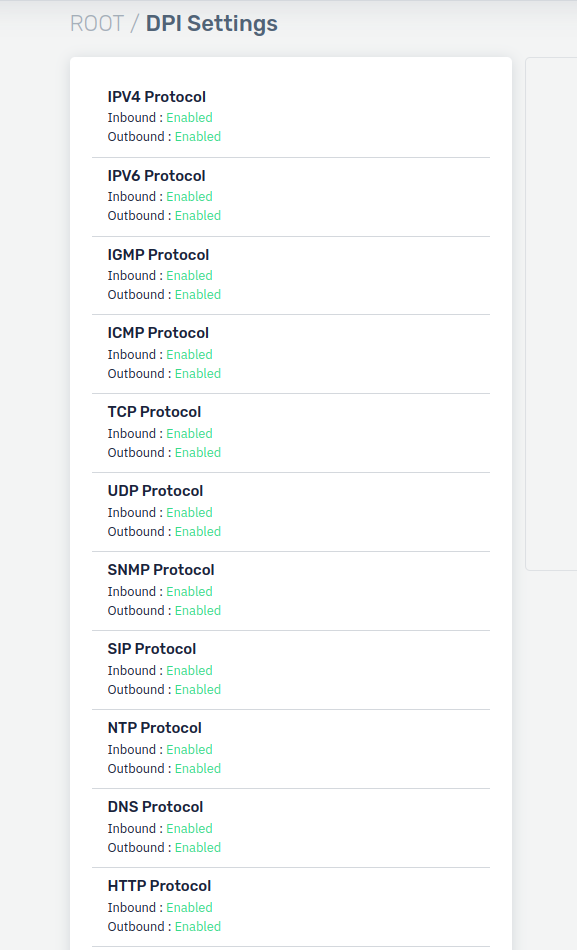
How to Use
-
Go to Apps > DDoS > Profile > DPI Settings
-
Configure the settings.
-
Click on Save Changes.
Description
IPV4 Protocol
Deep packet inspection of IPV4 header for bidirectional traffic
IPV6 Protocol
Deep packet inspection of IPV6 header for bidirectional traffic
IGMP Protocol
Deep packet inspection of IGMP header for bidirectional traffic
TCP Protocol
Deep packet inspection of TCP header for bidirectional traffic
UDP Protocol
Deep packet inspection of UDP header for bidirectional traffic
SNMP Protocol
Deep packet inspection of SNMP header for bidirectional traffic
SIP Protocol
Deep packet inspection of SIP header for bidirectional traffic
NTP Protocol
Deep packet inspection of NTP header for bidirectional traffic
DNS Protocol
Deep packet inspection of DNS header for bidirectional traffic
HTTP Protocol
Deep packet inspection of HTTP header for bidirectional traffic