kb-2002
How to mark all server origin cookies as Secure?
Problem Statement
The client requires to mark all the server origin cookies as Secure
Solution
Steps to solve
The client can achieve the requirement by creating the header rule as mentioned below
-
Login into Haltdos console.
-
Go to Stack > SLB(APP) > Listner > Rules > Header Rule
-
Now create header rule by entering the information mentioned below
-
Header Name: Set-cookie
-
Pattern: ^((?:.(?!\ [Ss]ecure))*)$
-
Header Value: \1;\ Secure
-
Action: Overwrite Response Header
-
Conditions: NA
- Click on save changes for saving the rule
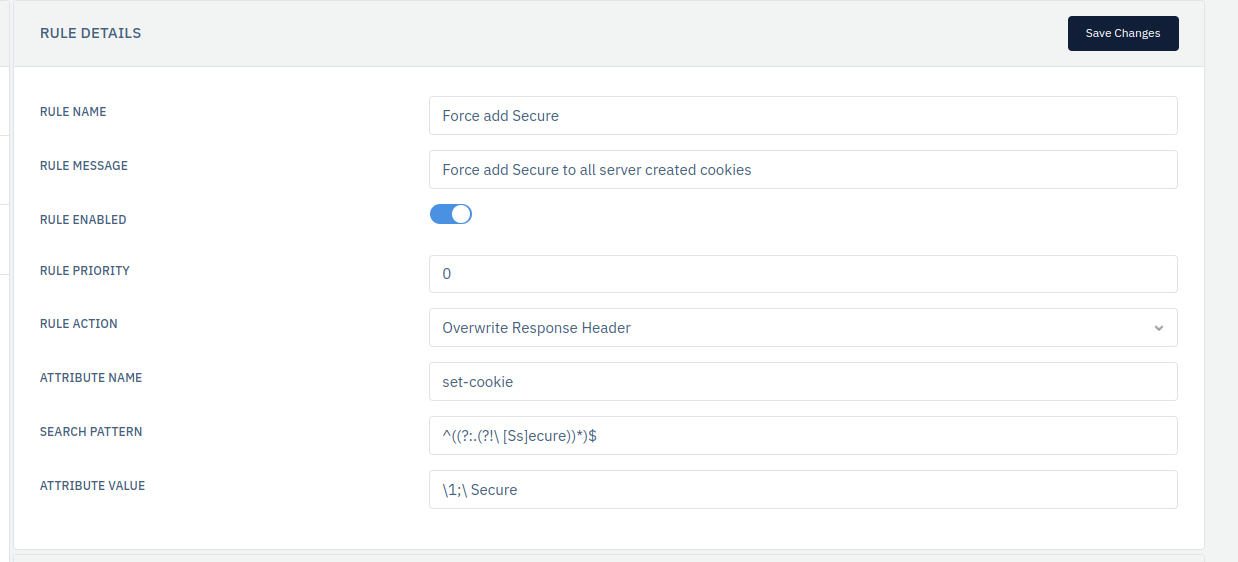
The above image shows creaton of header rule with overwriting the response header.