Deployment Architecture & Technical Overview
Haltdos MSSP (Managed Security Service Provider) is one of the deployment models of the Haltdos product. In this model, users log in through a GUI, which connects with the backend API to fetch data, apply configurations, and manage security policies. The aim of MSSP deployment is to provide continuous protection and ensure that customer services stay secure and available.
1. Introduction
MSSP provides outsourced monitoring and management for security devices and systems. Haltdos operates high-availability security operation centers, either from their own sites or through other data centers, to deliver 24/7 services. This helps businesses minimize the need to hire, train, and retain many security personnel to maintain a robust security stance.
2. Multi-Cloud and High Availability
MSSP deployment is designed as a multi-cloud solution, meaning mitigation components run on more than one cloud provider simultaneously. They operate in active-active mode, so if one provider or instance fails, another continues handling the traffic.
- High Availability: Probability of multiple cloud providers failing at the same time is very low.
- Customer Isolation: Each customer is placed in a separate virtual environment, so an attack on one customer does not affect others. Configuration, traffic, and data remain fully isolated, improving both security and reliability.
3. Control Plane
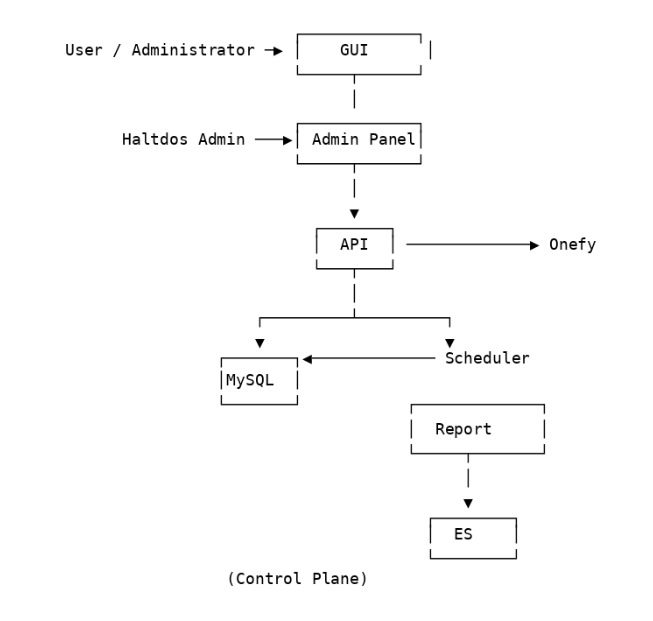
The Control Plane is the central management layer of the MSSP platform. It is responsible for storing configurations, managing policies, coordinating with services, and generating reports. All management-related tasks happen here.
Interfaces
- GUI (Graphical User Interface): Customer-facing web interface where users or administrators log in, manage policies, and monitor the platform.
- Admin Panel: Internal interface used by the Haltdos team to control the platform. Manages mitigation instances, databases, schedulers, collectors, and monitoring tools.
Main Components
| Component | Description |
|---|---|
| API | Handles requests from GUI and Admin Panel, communicating with other components. |
| MySQL | Stores configuration details, user policies, and other required data. |
| Scheduler | Automates recurring tasks like report generation and periodic jobs. Reads/writes schedules from MySQL. |
| Report | Generates system-wide reports. |
| Onefy | Used for DNS/CDN operations, simplifying onboarding and provider switching. |
| Elasticsearch (ES) | Stores logs and metrics for analysis and reporting. |
Control Plane Diagram:
4. Data Plane
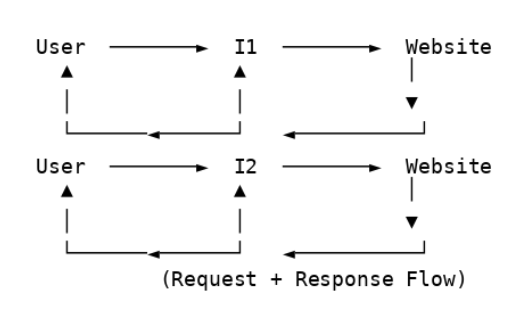
The Data Plane handles all live traffic. User requests pass through mitigation instances before reaching the protected application, and responses return through the same path.
Key Functions
- DDoS detection and mitigation
- WAF filtering and inspection
- Allowing only clean traffic to pass to the backend
Traffic is isolated per customer, so attacks on one customer do not impact others. If an instance fails, others continue processing traffic without interruption.
Data Plane Diagram:
5. Aux Plane (State Synchronization)
When multiple mitigation instances are active, they must share state information such as rate-limit counters, sessions, and policy changes.
- Handled via RabbitMQ in a publish-subscribe model:
- One instance publishes state changes
- All other instances receive and apply them
Aux Plane Diagram:

6. Stats Plane (Logs and Reporting)
The Stats Plane collects and stores logs, metrics, and operational data from mitigation instances.
- Each instance sends logs/metrics to a Collector
- Collector aggregates data
- Data stored in Elasticsearch (ES) for reporting, analytics, and dashboards
This provides a complete view of system activity, helps detect attacks, and supports analysis and troubleshooting.
Stats Plane Diagram:

7. DNS, FQDN, and Traffic Onboarding
Each customer is provided with a Fully Qualified Domain Name (FQDN). The customer updates their DNS records to point to this FQDN, ensuring traffic flows through the Haltdos platform.
- Onefy Service: Automates DNS/CDN integration without changing core configurations.