License Configuration
Haltdos provides managed security service provider (MSSP) offerings, which include outsourced monitoring and management for security devices and systems. Haltdos operates high-availability security operation centers, either from their own sites or through other data centers, to deliver 24/7 services. This helps businesses minimize the need to hire, train, and retain many security personnel to achieve and maintain a robust security stance.
License Configuration
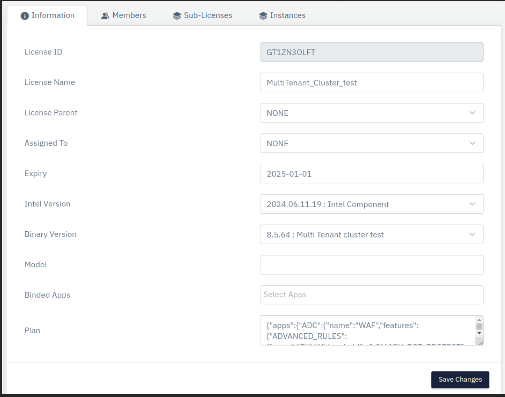
To configure the license, fill the fields accordingly:
Information
Overview
Haltdos configures a user parent license and allows the client to distribute its child licenses. The various fields in the license are described as follows:
License Id:
It shows the Id of the license (The parent’s Id would always be same as the child.). It will show the ID automatically after the license will be configured.
License Name:
It shows the name of the license.
Allowed Parameter: String

Default : Blank
License Parent:
A drop-down of list of licenses, user can select the respective parent license.
Allowed Parameter: Select Parent License

Default : Blank
Assigned to:
Assigned to which member.
Allowed Parameter: Select to whom it would be assigned to.

Default : Blank
Expiry:
Shows the date of license expiry.
Allowed Parameter: Select Date

Default : Blank
Intel Version:
A list of intel components that can be selected here.
Allowed Parameter: Select Intel Version.

Default : Blank
Binary Version:
A list of Binary versions that can be selected here.
Allowed Parameter: Select Binary Version.

Default : Blank
Model:
Select the model for which the license is getting created.
Allowed Parameter: Select Model.

Default : Blank
Binded Apps:
Select App which will be configured in the license.
Allowed Parameter: Select Apps.

Default : Blank
Plan:
Enter the license plan.
Allowed Parameter: Enter Apps.

Default : Blank
Sub -License
Overview
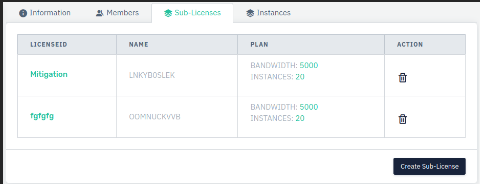
It shows the list of sub-licenses(Child License) of the parent license, a single parent license can have multiple sub/child licenses.
To Create Sub-License
-
Go to License > Select your License(Parent license) > Go to Sub-License.
-
Click on Create Sub-License > Configure Sub-License.
-
Click on Add.