Group Ports
Logical Interface
Logical interface is a grouping mechanism of physical Interfaces configured on Link Load Balancer including LAN & WAN. Users can create, modify, delete interface groups, and set desired monitor types for each interface group.
High availability (HA) is the ability of a system to operate continuously without failure for a designated period of time. HA works to ensure a system meets an agreed-upon operational performance level. High availability (HA) is usually required in a system where there is high demand for a little downtime. Haltdos LLB has the option of a logical grouping of physical interfaces for a highly available WAN connectivity structure.
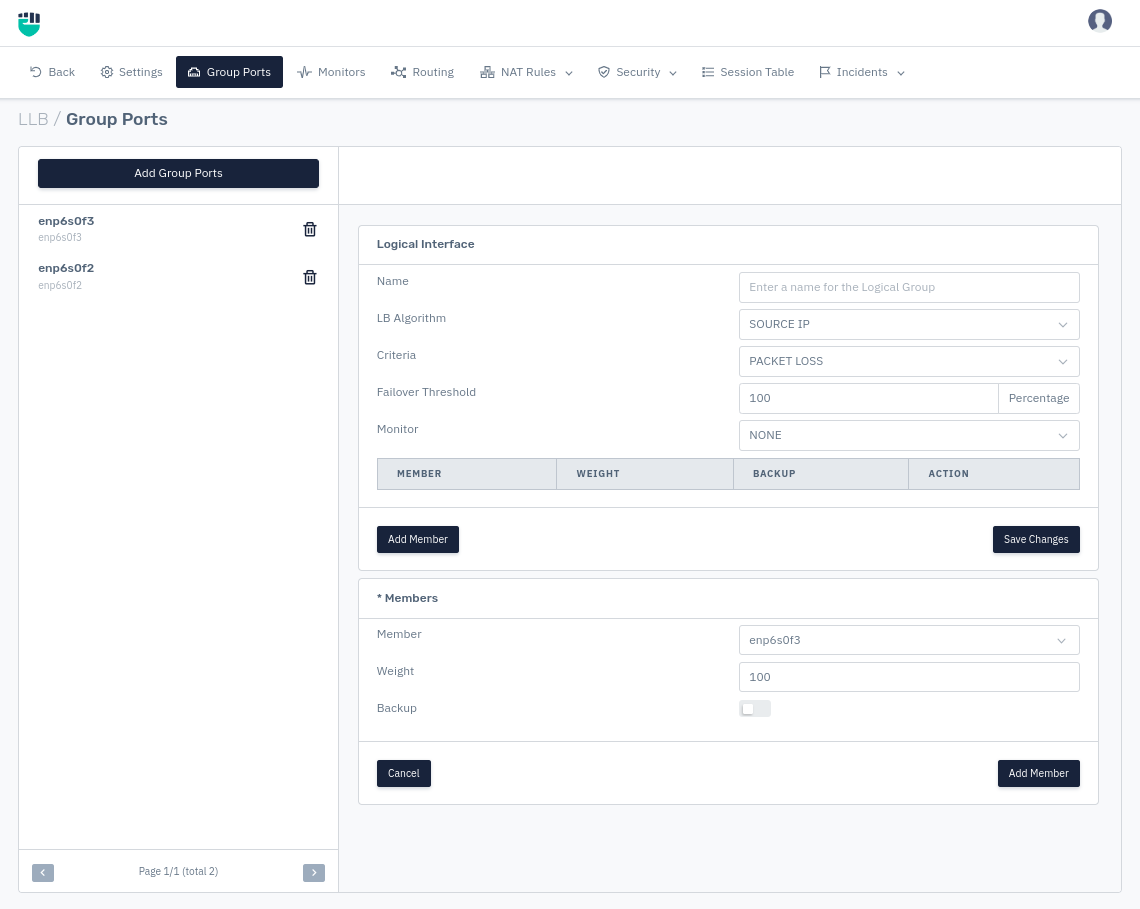
How to Use:
-
Go to Apps > LLB > Group Ports.
-
Click on Add Group Ports
-
Configure your settings.
-
Click Save.
Description:
Name
It allows the user to add a Group Name.
    Accepted values: String

    Default: Blank
LB Algorithm
This option species the WAN Load Balancing algorithm used to balance the load between multiple WAN links. Users can select the WAN algorithm from the drop-down menu. In Haltdos LLB users get many WAN algorithms which are mentioned below.
    Accepted values: Round Robin / Source IP / Bandwidth / Sessions

    Default: 600
a) Round Robin: The administrator assigns a weight to each WAN connection based on criteria of their choosing for their traffic-handling capability. If the WAN 1 connection is twice as better for data communication as WAN 2. then WAN 1 is to be given a double weight value in comparison to WAN 2.
b) Source IP: Source IP hash load balancing algorithm that combines source and destination IP addresses of the users and websites to generate a unique hash key. The key is used to allocate the client to a particular server. As the key can be regenerated if the session is broken, the client request is directed to the same server it was using previously.
c) Bandwidth: In the least bandwidth method Users are selected based on the WAN Link's bandwidth consumption i.e WAN connection that consumes the high bandwidth is selected (measured in Mbps).
d) Sessions: Session load balancing is a dynamic load balancing algorithm where user requests are distributed to the WAN connection with the least number of active connections at the time the user's request is received.
Criteria
It specifies the other network-based conditions for load balancing. Users can select from many options to figure out any network fluctuation in connectivity. Users can set their packet drop, jitter, latency, etc.
    Accepted values: LATENCY / PACKET LOSS / JITTER / NONE

    Default: Blank
Failover Threshold
Specify the failover threshold in percentage of (active / total) primary servers for switching to backup servers.
    Accepted values: Integer

    Default: 100
Monitor Type
It allows the user to select the rule to monitor the terrific. This monitor rule can be added from Monitors.
    Accepted values: Select Monitor Type

    Default: NOne
Member
This option will show a list of all WAN links with their names.
    Accepted values: Select Member

    Default: Blank
Weight
This option allows the user to set the weight value for an interface. This is a static numerical weighting. Interface with higher ratings gets more requests sent to them.
    Accepted values: Integer

    Default: 100
Backup
This field allows the user to enable or disable the backup. By default, It's set on disable.
    Accepted values: Enable / Disable

    Default: Disable