Settings
Overview
Profile Setting specifies all the operational settings for user different application type (i.e. WEBSITE/WEB SERVICE/WEB SOCKET). It provides user protection and invokes signature rules to every configured specific settings for mentioned application type. Haltdos WAF supports all HTML versions (including HTML5).
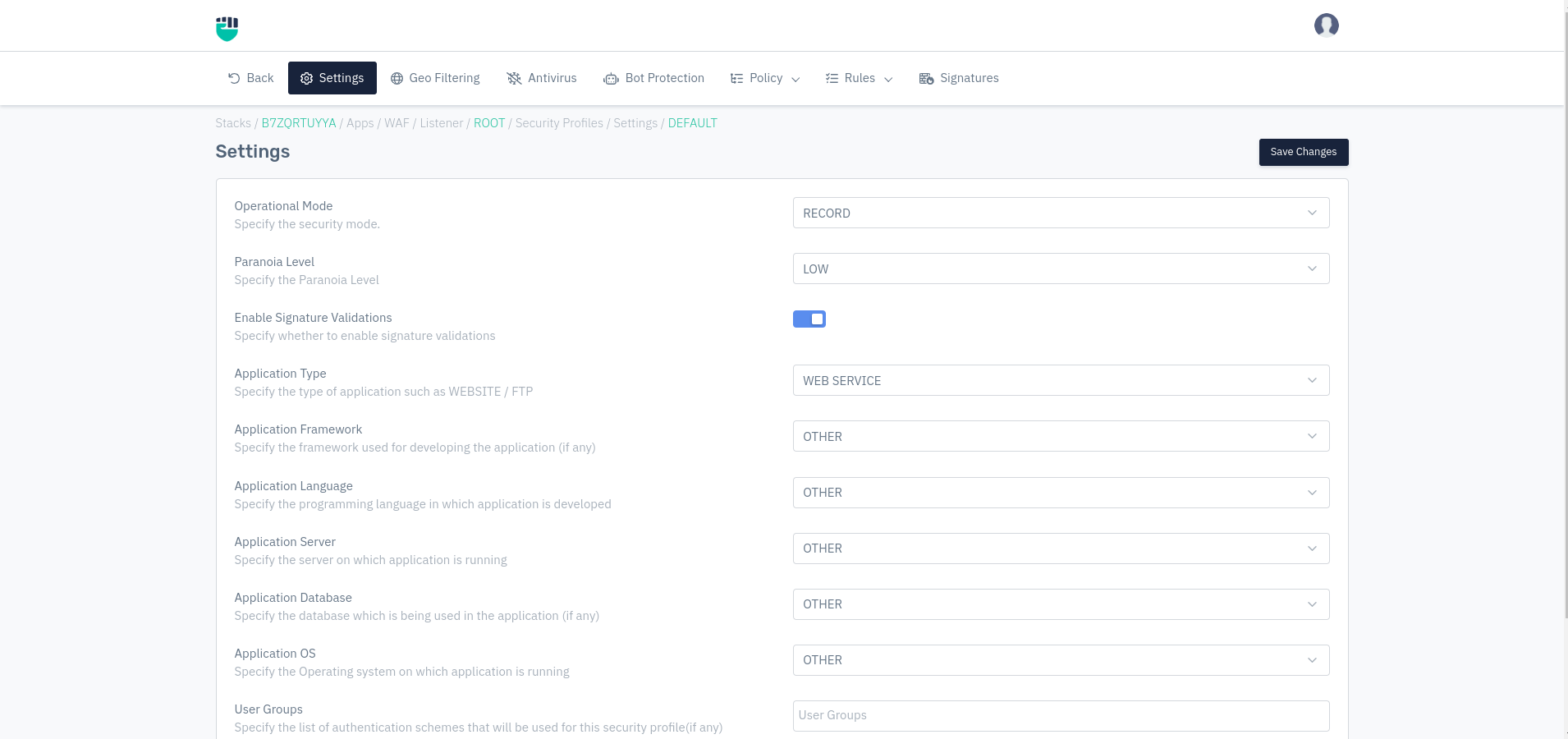
How to Use:
- Go to WAF > Listener > Profiles > Settings.
- Configure your settings.
- Click on Save Changes.
Description
Operational Mode
This option allows user to specify operational mode for every given security profile. Different operational modes are:
    Accepted values: MITIGATION / BYPASS / RECORD

    Default: RECORD
-
MITIGATION: In this mode, all the mitigation & rule sets will monitor the traffic. If any request matches the criteria, it gets dropped
-
BYPASS: In this mode, all the requests get bypassed without any filtration of mitigation & rule sets.
-
RECORD: In this mode, all the mitigation & rule sets will monitor the traffic. If any request is about to drop, then it gets captured and forwarded in the form of a Record Event.
Paranoia Level
Paranoia Level configures the severity in which HTTP requests should be allowed. It lets you disable certain rules to minimize several false positives that they may encounter.
    Accepted values: LOW / MEDIUM / HIGH / UNDER ATTACK

    Default: RECORD
Note: Higher paranoia can also result in false positives.
Haltdos WAF comes with four Security Paranoia Levels:
-
LOW -Adequate security level to defend almost all web applications from generic exploits. Recommended security level to ensure the least disruption from false positives.
-
MEDIUM - A slightly higher level of security to block nearly all web application exploits. It might result in some false positives.
-
HIGH - A more paranoid approach to web security. It delivers a higher number of false positives.
-
UNDER ATACK - The most paranoid defensive security method. It blocks sufficient legitimate requests to your site.
Enable Signature Validation
Users can specify to enable the signature validation for the present profile.
    Accepted values: Enable / Disable

    Default: Disable
Application Type
Specify the type of application (i.e. website or web service). A website is a collection of linked web pages (plus their associated resources) that share a unique domain name. A web service is a collection of open protocols and standards used for exchanging data between applications or systems.
    Accepted values: WEBSITE / WEB SERVICE / WEB SOCKET

    Default: WEBSITE
Application Framework
Specify the framework used for developing the application (if any).
    Accepted values: Drupal / Wordpress / joomla / Larvel / Magento / MediaWIKI / MYBB / OSCOMMERCE / PHBB / PHPMYADMIN / SYMFONY / VBULLETIN / TYPO3 / SHAREPOINT / SAP / DOMINO / PEOPLE-SOFT / Other

    Default: Other
Application Language
Specify the programming language in which application is developed.
    Accepted values: JAVA / DOTNET / PHP / PYTHON / GO / Other

    Default: Other
Application Server
Specify the server on which application is running.
    Accepted values: IIS / APACHE / TOMCAT / Other

    Default: Other
Application Database
Specify the database which is being used in the application (if any).
    Accepted values: MYSQL / PGSQL / MSSQL / ORACLE / NOSQL / MONGODB / MSACCESS / DB2 / EMC / FIREBIRD / FRONTBASE / HSQLDB / INFORMIX / INGRES / MAXDB / SQLITE / SYBASE / INTERBASE / Other

    Default: Other
Application OS
Specify the Operating system on which application is running.
    Accepted values: Window / Unix / Other

    Default: Other
User Groups
Create a user group for operating the API gateway. Detailed information can be found using this link User Group.
    Accepted values: list of authentication schemes

    Default: Blank
Temporary Blacklist Duration
The time duration for which a malicious IP is suspended by WAF is specified here. The WAF Rules and Web Policy use this value.
    Accepted values: Integer

    Default: 0
Matric: Seconds