Compression
Configure compression or decompression of responses
Overview
Haltdos provides you the ability to compress or decompress the responses which often significantly reduce the size of transmitted data and increase performance. The compression level is defined based on which responses are compressed to an extent. It also allows configuring other settings for compression.
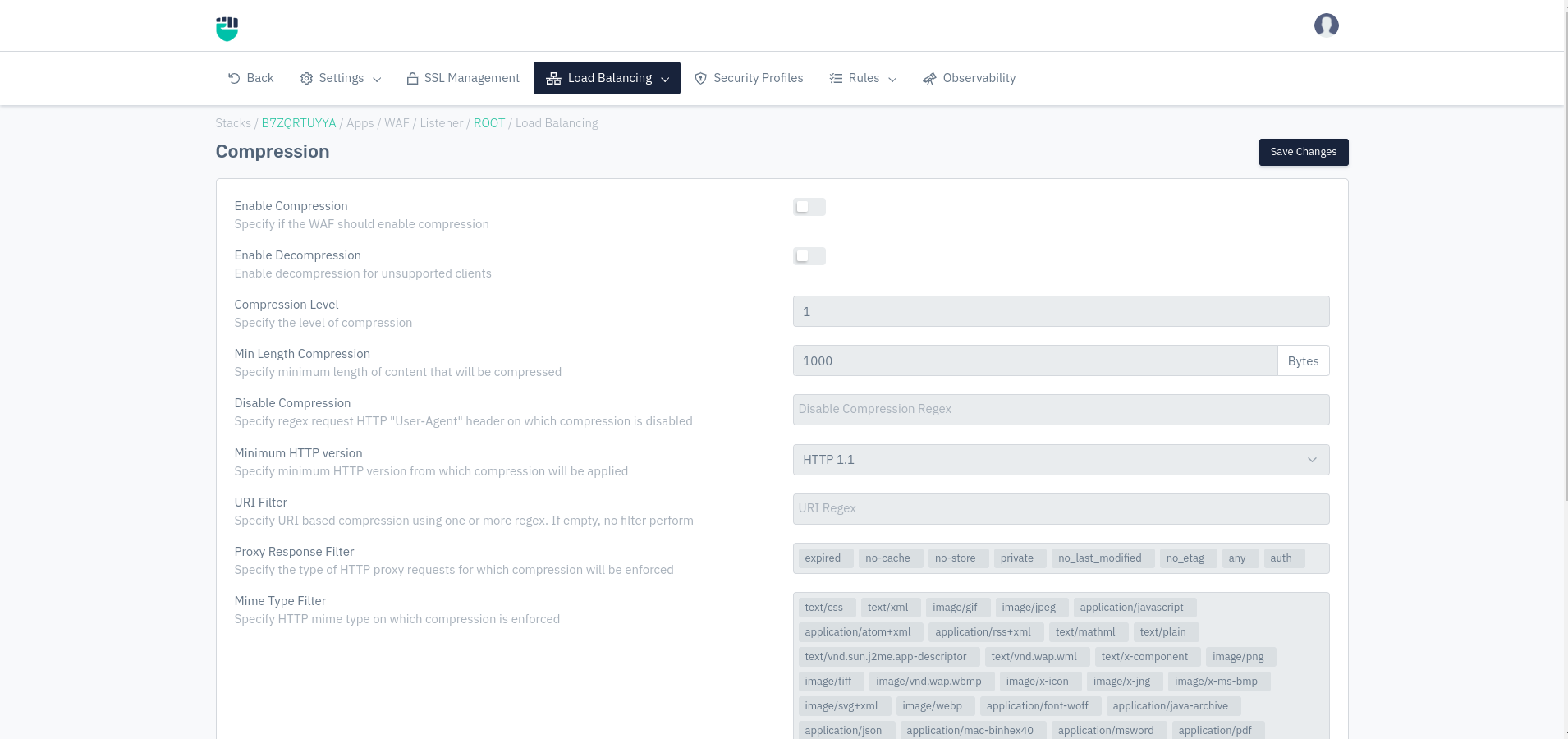

How to Use :
- Go to WAF > Listeners > Performance > Compression
- Click on **Add Compression Configuration **
- Click Save Changes
Description
Enable Compression
To enable compression, enable the toggle button. It compresses the responses to an extent.
    Accepted values: Enabled / Disabled

    Default: Disabled
Enable Decompression
Enable decompression for unsupported clients
    Accepted values: Enabled / Disabled

    Default: Disabled
Compression Level
The level of compression to be achieved. The greater the number more the compression. The range is 1 - 9.
    Accepted values: Integer(1-9)

    Default: 1
Min Length Compression
This field specifies the minimum length of the response to be compressed.
    Accepted values: Length in bytes

    Default: 1000
Metric: Bytes
Disable Compression
Specify one or more regular expressions (Regex) that will be evaluated on HTTP requests and disable compression for matching requests.
    Accepted values: Regex

    Default: Blank
Minimum HTTP Version
Specify the minimum HTTP version from which compression will be applied. The response above the specified version is compressed.
    Accepted values: Default value set

    Default: HTTP 1.1
URI Filter
This field allows performing compression on the specific URI using one or more regex. If the field is empty then no filter perform.
    Accepted values: Regex

    Default: Blank
Proxy Response Filter
This field allows performing compression on the specific type of HTTP requests.
    Accepted values: expired / no-cache / no-store / private / no_last_modified / no_etag / any / auth

    Default: expired / no-cache / no-store / private / no_last_modified / no_etag / any / auth
Mime Type Filter
By default, WAF compresses responses only with MIME-type text/HTML. To compress responses with other MIME types then include them in this field.
    Accepted values: Any mime type

    Default: text/xml / image/gif / image/jpeg / application/javascript / application/atom+xml / application/rss+xml / text/mathml / text/plain / text/vnd.sun.j2me.app-descriptor / text/vnd.wap.wml / text/x-component / image/png / image/tiff / image/vnd.wap.wbmp / image/x-icon / image/x-jng image/x-ms-bmp image/svg+xml image/webp / application/font-woff / application/java-archive / application/json / application/mac-binhex40 / application/msword / application/pdf / application/postscript / application/rtf / application/vnd.apple.mpegurl / application/vnd.ms-excel / application/vnd.ms-fontobject / application/vnd.ms-powerpoint / application/vnd.wap.wmlc / application/vnd.google-earth.kml+xml / application/vnd.google-earth.kmz / application/x-7z-compressed / application/x-cocoa / application/x-java-archive-diff / application/x-java-jnlp-file / application/x-makeself / application/x-perl / application/x-pilot / application/x-rar-compressed / application/x-redhat-package-manager / application/x-sea / application/x-shockwave-flash / application/x-stuffit application/x-tcl / application/x-x509-ca-cert / application/x-xpinstall / application/xhtml+xml / application/xspf+xml / application/zip / application/octet-stream / application/octet-stream / application/octet-stream / application/octet-stream / application/octet-stream / application/vnd.openxmlformats-officedocument.wordprocessingml.document / application/vnd.openxmlformats-officedocument.spreadsheetml.sheet / application/vnd.openxmlformats-officedocument.presentationml.presentation audio/midi / audio/mpeg audio/ogg / audio/x-m4a / audio/x-realaudio / video/3gpp / video/mp2t / video/mp4 / video/mpeg / video/quicktime / video/webm / video/x-flv video/x-m4v / video/x-mng / video/x-ms-asf / video/x-ms-wmv / video/x-msvideo
Decompression
Some clients do not support responses with the GZIP encoding method. At the same time, it might be desirable to store compressed data, or compress responses on the fly and store them in the cache. To successfully serve both clients that do and do not accept compressed data, WAF can decompress data on the fly when sending it to the latter type of client.