Rule Staging
Rule Staging allow WAF to stage for the record purposes of the signatures.
Overview
Users can configure below rule staging settings for Listener.
Automatic Updates and Staging Process
All updates are automatically pushed to the system. These rules are initially placed in staging mode before being deployed to production. This process ensures that if any disruptions occur in the production environment, the system can easily roll back to the previous staging mode, minimizing potential impacts.
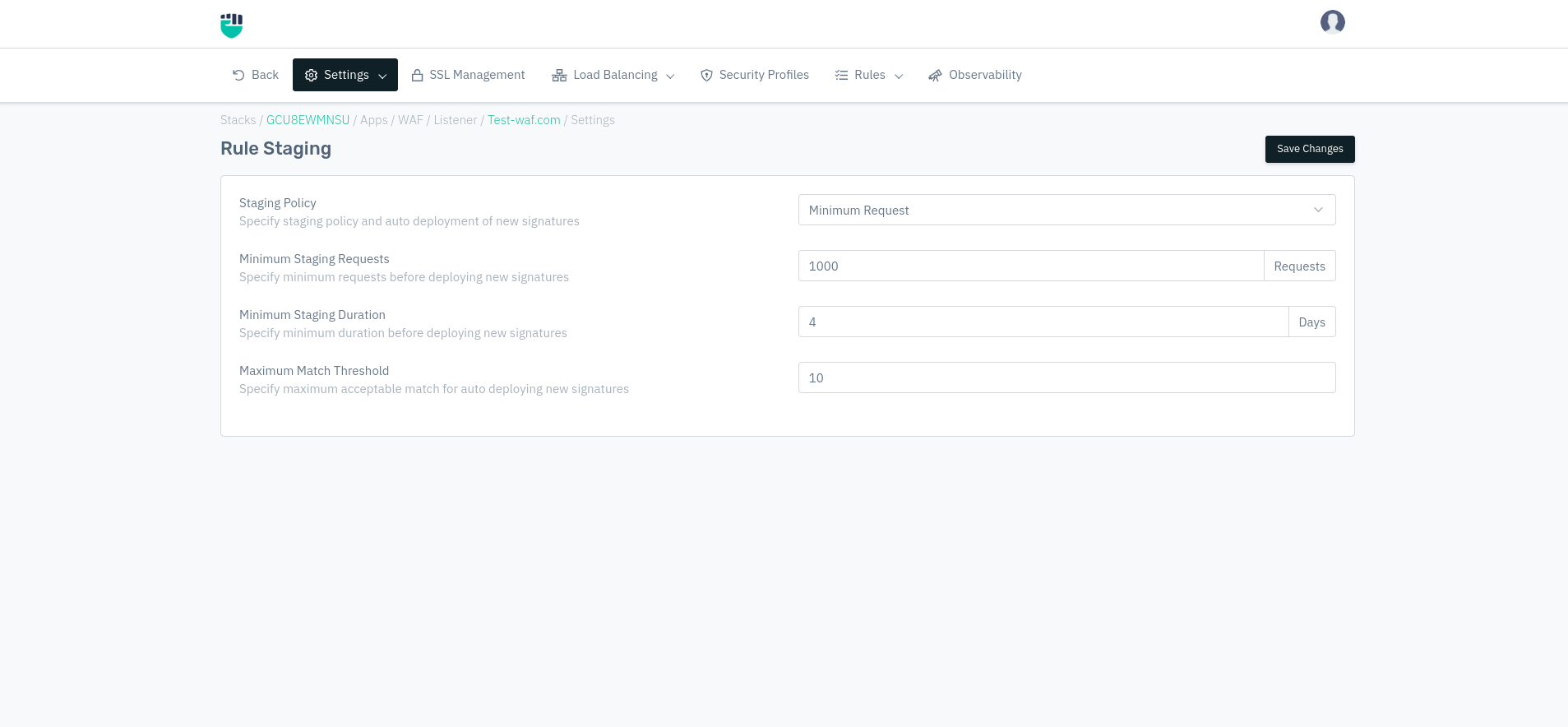
How to Use:
- Go to WAF > Listener > Settings > Rule Staging.
- Configure the settings.
- Click on Save changes.
Description
Staging Policy
Users can specify the staging policy and auto-deployment of new signatures.
    Accepted values: Manual / Minimal Request / Minimal Duration / Minimal Request & Duration / Minimal Request or Duration / Learning Window

    Default: Manual
Minimum Staging Requests
Users can specify minimum requests before deploying new signatures. By default, it is 10000 requests.
    Accepted values: Integer

    Default: 1000
Minimum Staging Duration
Users can specify minimum duration before deploying new signatures. By default, it is 4 days.
    Accepted values: Integer

    Default: 4
Maximum Match Threshold
Users can specify maximum acceptable match for auto deploying new signatures.
    Accepted values: Integer

    Default: 10